
My late-2011 MacBook Pro has been good to me and served us well for years, but for work and editing videos it has it’s limitations. I’ve been using it with an external monitor for a second screen, but it was awkward and took up a lot of desk space. Video editing was ok, but could be better – for heavy graphic and video work the Intel HD 3000 graphics were holding me back a bit.
James knew I was frustrated, but with our limited budget we wouldn’t have been able to upgrade me to a Mac with the kind of processing power I was hankering for. So, he started looking into the world of the “Hackintosh” – an Intel PC built to run Mac OS X instead of Windows. We built our first Hackintosh years ago for a home media server, and I can tell you that it has got a lot easier since then!
Once we knew that “Golden Builds” were possible, I challenged James to build me one, for work & blogging. I’m going to be selling my souped up MacBook Pro to cover around half of our costs, and the rest I should earn back fairly soon through work, as I have some larger projects coming up. A Golden Build Hackintosh is one where everything works properly; iMessage, Handoff, and so on.

The Hardware
What we purchased:
- Monitor – AOC 28″ 4K UHD
- Motherboard – Gigabyte H170N-WIFI
- Case – Cooler Master RC-110-KKN2 Elite 110
- CPU – Intel i5 6600k Skylake 3.5 GHz
- CPU fan – Noctua NH-L9x65
- Hard Drive – Seagate SSHD 2TB
- PSU – Corsair CXM 430W
- RAM – Viper Elite Series DDR4 16GB (2 x 8GB)
- Wifi – Broadcom BCM94352Z
- Graphics – EVGA GeFore GTX 750 Ti
- Sata Cables
- Speakers – Logitech Z150
What we already had:
- Hard Drive – SanDisk Extreme Pro SSD 240GB
- Keyboard – Logitech K310 Washable Keyboard
- Mouse – Apple Magic Mouse (v1)
We opted for a small case that fits nicely on the back corner of my desk. The machine is much quieter than my MacBook Pro, and I love having a single large screen on my desk instead of the 13″ and 19″ combo I used to have. I’m running my operating system & applications off the 240GB SSD, and have my media libraries on the 2TB fusion drive, with plenty of space left for work graphics, photos, videos & music.

The Cost
We spent a total of £933.27 on hardware. If you don’t include the monitor (£251.85) or speakers (£13.99), the cost of the case & everything in it comes to £667.43. The current cost of our SSD is £99.99, so that would take the case + internals cost up to £767.42. Add everything together; including the monitor & current price of the hardware we already had, and it comes to a total of £1,126.14. We used Flubit to save up to 10% on some of the Amazon prices, which meant that we could afford to go for a slightly better CPU than originally planned.
The Install
To install Mac OS X El Capitan, we followed this guide, with a few tweaks to iron out the odd issue – mostly with the wifi & bluetooth card not working properly straight away. It was fairly straightforward, we just followed it step by step and we went from building to have everything installed and all my data on in a few days. If you are considering building a Hackintosh I definitely recommend the tonymacx86.com website, it is a mine of information and people willing to help you solve your problems.
The Performance
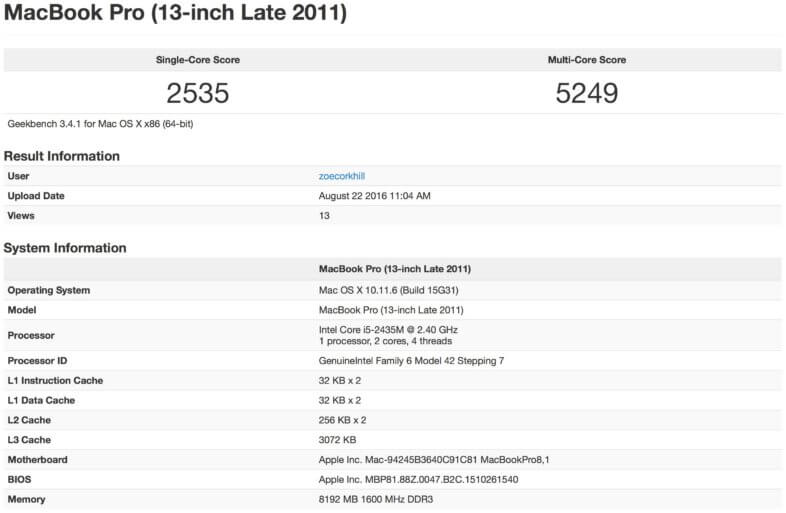
I am delighted with my new machine. Almost everything works (I’m having trouble with a single front USB port but I think it might be a hardware issue with the case at this point) and I can use iMessage and so on with it, just like any Mac. It is fast, great for editing photos, graphics & videos, and I’ve enjoyed “testing” a few games on it too. We used Geekbench 3 to benchmark both my MacBook Pro and the new Hackintosh. My multi-core score is over 2.5 higher.

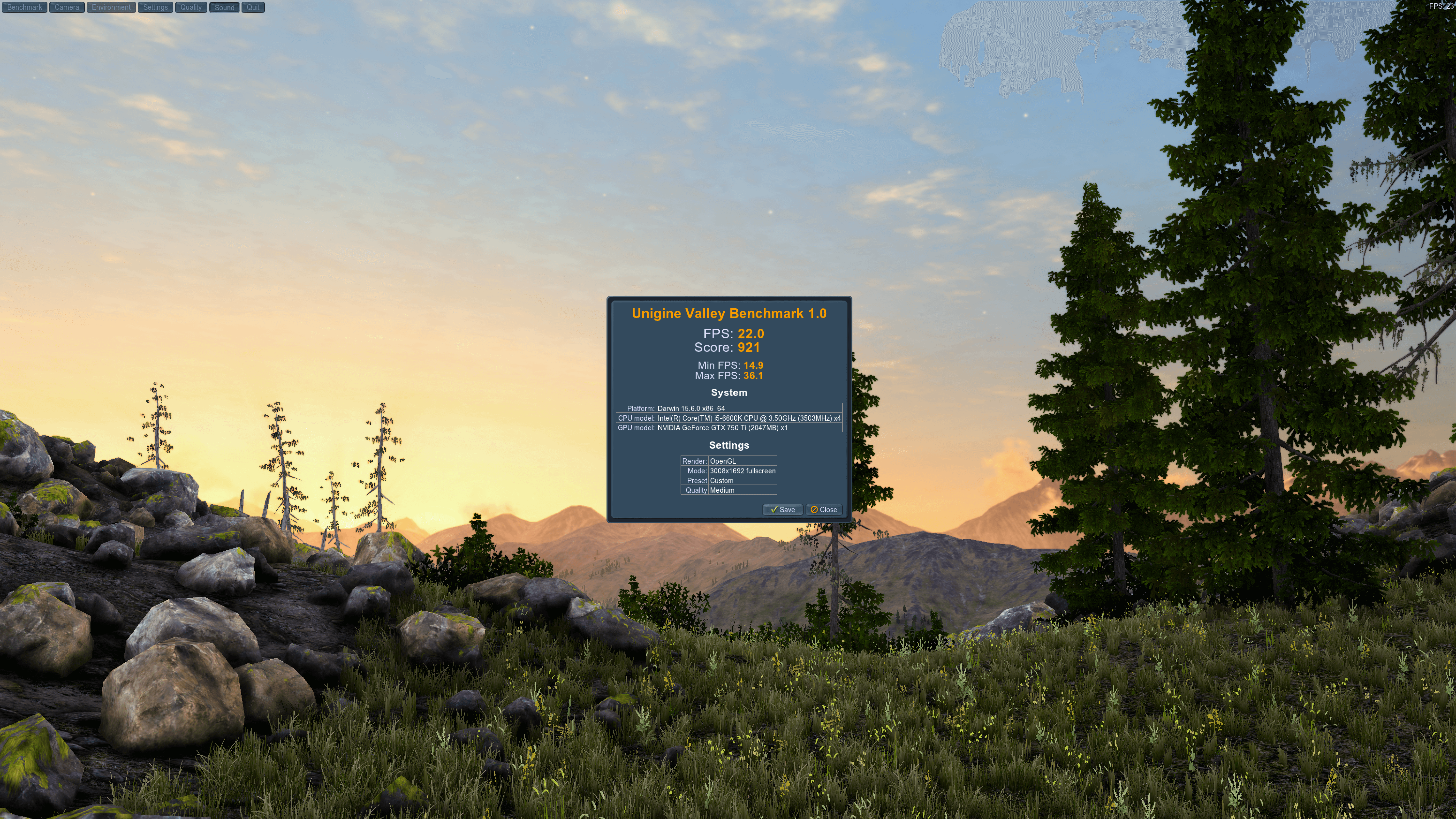
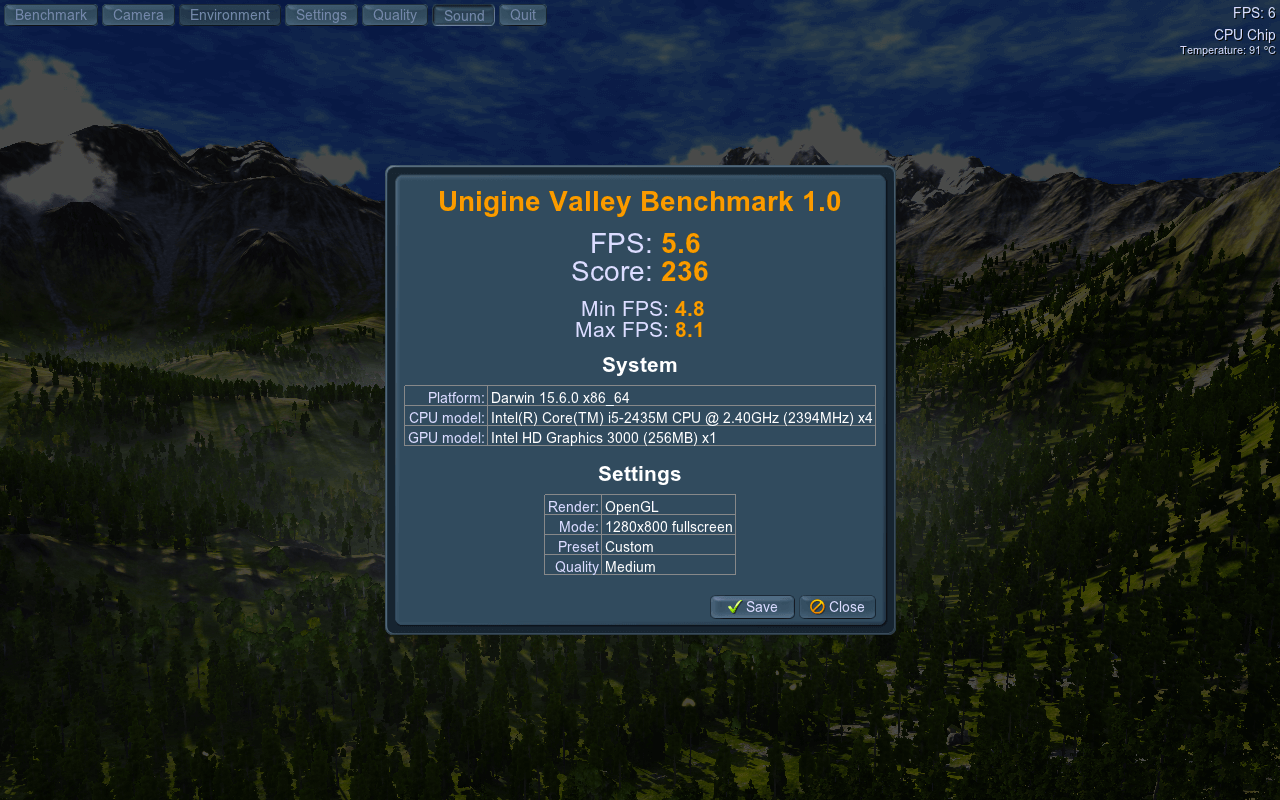
We also tested the graphics with Unigine Valley Benchmark. The score for my MacBook Pro got 236, and the Hackintosh was 921 – almost four times higher.
Conclusion
I’m very happy! The nearest iMac cost wise is a 21.5 inch iMac, which has lower specs and is pricey to configure up to similar RAM etc. This machine is working brilliantly and will last me years. I prefer to work at my desk, and I have my iPad Pro for anything on-the-go I need, so giving up my laptop for a desktop machine doesn’t feel like a big deal anymore. Work is going to be more enjoyable now too, as I’ll be less frustrated.
You have to be comfortable with putting the hardware together and going through the complex install process to build one, but there are brilliant guides out there to follow. I definitely recommend building one though, if you like Macs but have a smaller budget.

You know I am not as ‘geek’ as you and this post mainly went over my head. I had no idea this was possible and have no idea why anyone would need to do this BUT if it’s what you wanted and it gives you the performance you need for a lower cost then it’s all good! I am sure this post will be really popular – you’re great at the techy side of things x
Haha! It’s great and I love it. It is way more power than I could have afforded if I’d bought a Mac mini or iMac
I love this idea, might have to set my hubby a challenge!